With P3Dv3, Adobe Scaleform is being used for user interfaces like menus, ATC Window, and Simconnect created menus by other apps like GSX, ProATC X etc.
Sunday, April 10, 2016

Monday, November 30, 2015
AT&T Network Client error - "VPN server list could not be obtained from the server (RIG0420E)"
If you get this error, one reason might be an in-correct password, but in my case it was because I had upgraded my hard-disk. I had to re-enter my password to get it to connect again (un-check use stored credentials once). Looks like the HDD is used to generate some sort of key to store the password, or something like that, so you need to re-enter the password if you change your hard-disk.
AT&T Client could do with an more accurate error message though...
AT&T Client could do with an more accurate error message though...
Saturday, April 11, 2015
Traffic Optimizer for FSX/P3D
Traffic Optimizer and FSX-SE
Some people have reported issues while running the optimizer with FSX-SE. While I did buy the SE, I haven't got around to install it and test. Till I get around to that, please search the original FSX and P3D threads over at avsim for possible solutions.
The most common solution was reinstalling SP1 Simconnect from:
...\Lockheed Martin\Prepar3D v2\redist\Interface\FSX-SP1\retail\lib
or from the FSX SDK folder:
...\Microsoft Games\Microsoft Flight Simulator X SDK\SDK\Core Utilities Kit\SimConnect SDK\LegacyInterfaces\FSX-SP1
Also some people reported that they could not access the link:
This link does work. Some companies, including where I work, block mediafire website. So that might be the issue. I would suggest accessing it from your home network.
I do have a minor update which gives better AI distribution in large airports, but I have got around to releasing it. I hope soon...
I'd be happy to answer any questions here directly.
Sunday, February 15, 2015
The maths of discounting - courtesy Myantra / Jabong
An pair of shoes cost 2495 at MRP, and are being sold at a discount of 30%. So how much will you finally pay?
2495 - 2495*30% = 2495 - 748.5 = 1746.5
Pretty simple, right? Apparently Myantra and Jabong disagree. In their maths you will actually pay 1934.
Which is actually a discount of 22.5%.
The thing is that they show this 30% discount on the product page, but add up VAT at checkout. So while the product page will show 30% discounted price of 1746, the final checkout will show 1934. Normally all this is fine, as the customer knows finally what is paying.
But the issue is that if the item is not discounted, then the price you see on the product page is what you will pay on checkout. So if the product page shows 2999 at MRP, then that's the final price you pay.
Myantra / Jabong will claim that they bear the VAT if there is no discount, so some such logic. This is immaterial to the customer.
This practice is patently misleading. If you claim 30% discount, then that's the price the customer should pay.
Note that Flipkart, Amazon or Ebay don't do this. They actually list the price you finally pay.
So why can't Myantra/Jabong do the same? Why can't they just list the actual price payable by the customer? Is it too much maths?
PMDG 777 FPS Improvements
The PMDG T7 is finally out of the P3D but performance is quite below average. For example my system gives me 40fps with Aerosoft 320, but only 24fps with PMDG 777.
So here are few tips to get more juice out of it.
Note that I use Lenovo Y510p notebook with 4700MQ@2.8GHz with GT755M in SLI. YMMV.
Of course, backup the original files without fail before you do these modifications.
1. Change panel resolutions
Edit the panel.cfg (Prepar3D v2\SimObjects\Airplanes\PMDG 777-200LR\panel) to make these changes.
Look for VC section from [VCockpit01] to [VCockpit40]. In each one these is this entry:
pixel_size=1024,1024
Halve these values from 1024 to 512, so that you have:
pixel_size=512,512
You can halve all 40, but I think its enough to just halve the large values like 1024 and 512 to 512 and 256 respectively. Note that one VC section has both values different, e.g. pixel_size=1024,512, so that should be halved to pixel_size=512,256.
2. Replicate Pilot's panel's to Co-Pilot
In the same panel cfg, look for [VCockpit04]. This contains Pilot's and CoPilot's MFDs.
Look for gauge03 line. In this line change the word RIGHT_INBD to LEFT_INBD.
Look for gauge04 line. In this line change the word RIGHT_OUTBD to LEFT_OUTBD.
Now co-pilot MFDs will render same as Pilot.
Note you can also change CoPilot and Center CDUs to render as Pilot's CDU in [VCockpit10], change R and C to L. Not sure if this makes much of a performance difference.
After these two I get 27fps, up from 24fps. About 10-15% increase.
Same tips should work for FSX version also.
Enjoy!
Sunday, January 4, 2015
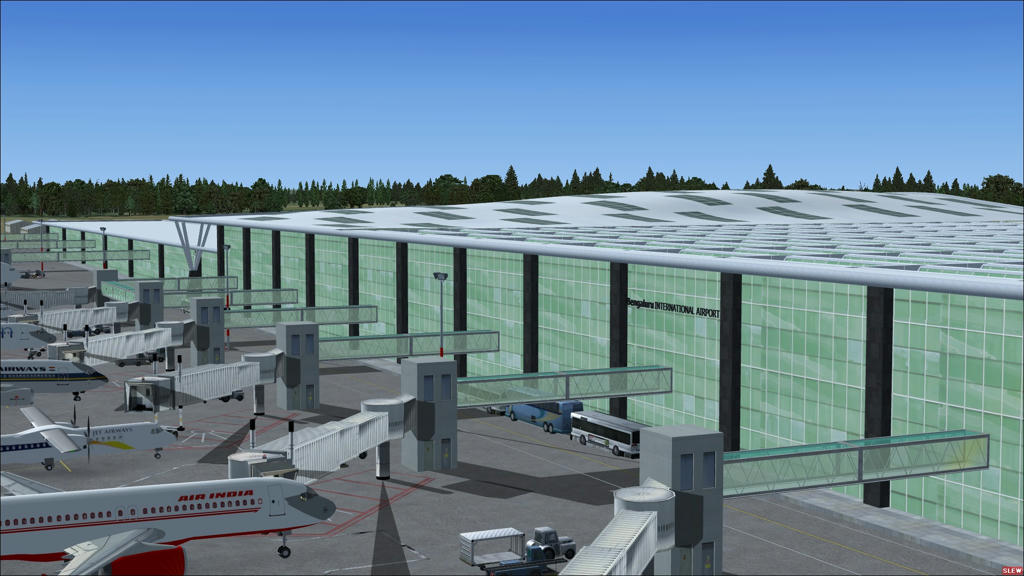
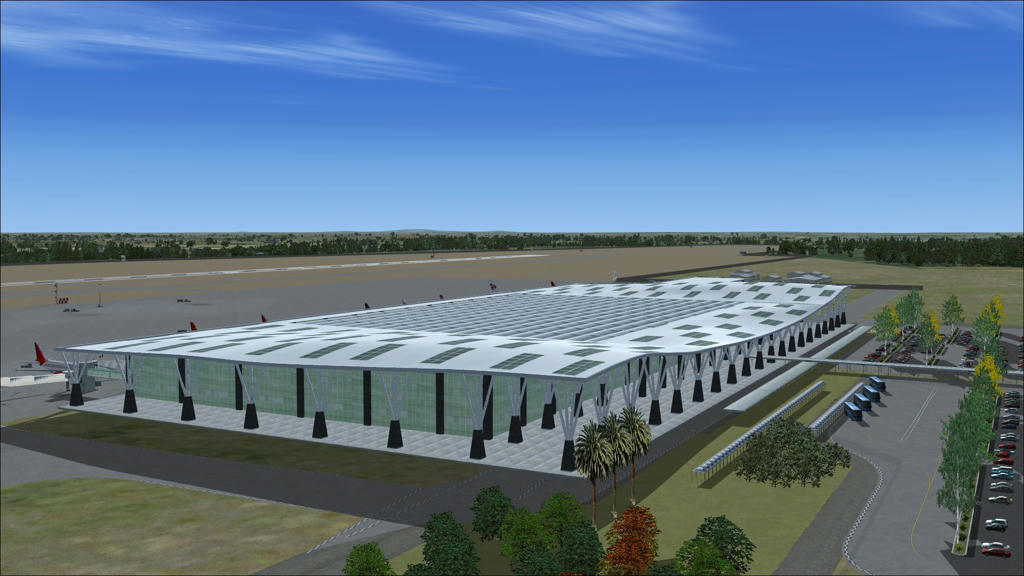
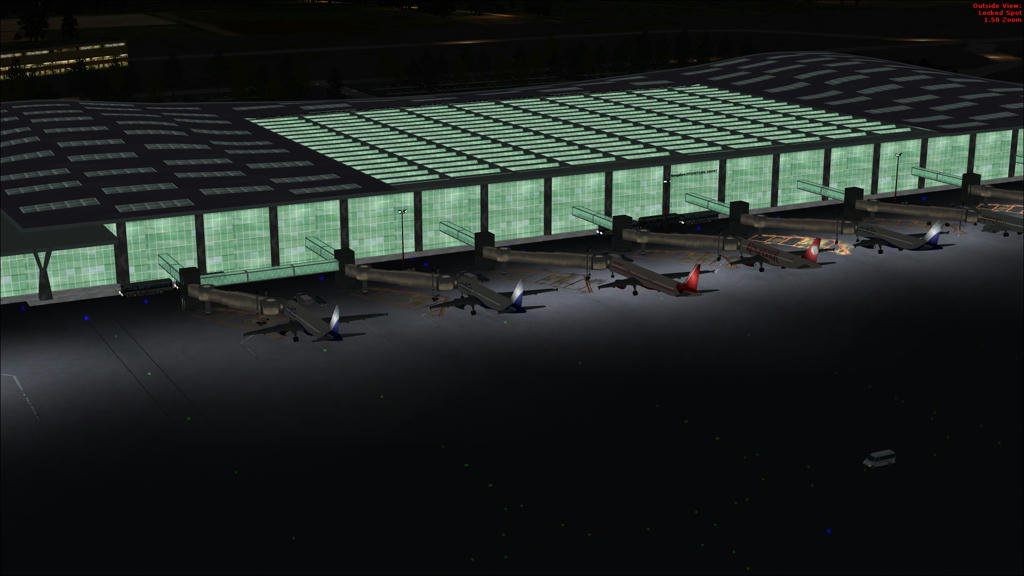
[FSX/P3D] Freeware Airport - Bangalore International Airport - VOBL
This is the scenery for Bangalore International Airport - http://en.wikipedia.org/wiki/Kempegowda_International_Airport. The main terminal is as accurate as I could make it. Rest of the objects are stock objects. The ILS/NAV frequencies are accurate. Parking locations are not accurate as per the actual Airport.
The following tools were used to make it:
SketchUp for terminal design
GIMP / VS 2013 for Textures
Instant Scenery / AFX / Airport Studio for Airport design
ModelConvertorX for adjustments
Usage Rights:
One or more textures on this 3D model have been created with images from CGTextures.com. These images may not be redistributed by default, please visit www.cgtextures.com for more information.
Rest, Free to distribute / modify as you want as long as this Readme.txt is included.
How to Install:
Extract the zip to Addon Scenery directory (e.g. Microsoft Flight Simulator X\Addon Scenery\). You should then have a VOBL_DUKE sub-folder inside.
Add the VOBL_DUKE folder to the FSX/P3D using the "Scenery Library" -> "Add Area" option.
http://www.mediafire.com/download/he1deys18a06n0g/VOBL_DUKE.zip
Few Images:
The following tools were used to make it:
SketchUp for terminal design
GIMP / VS 2013 for Textures
Instant Scenery / AFX / Airport Studio for Airport design
ModelConvertorX for adjustments
Usage Rights:
One or more textures on this 3D model have been created with images from CGTextures.com. These images may not be redistributed by default, please visit www.cgtextures.com for more information.
Rest, Free to distribute / modify as you want as long as this Readme.txt is included.
How to Install:
Extract the zip to Addon Scenery directory (e.g. Microsoft Flight Simulator X\Addon Scenery\). You should then have a VOBL_DUKE sub-folder inside.
Add the VOBL_DUKE folder to the FSX/P3D using the "Scenery Library" -> "Add Area" option.
http://www.mediafire.com/download/he1deys18a06n0g/VOBL_DUKE.zip
Few Images:
Saturday, January 3, 2015
Flipkart, Amazon, Snapdeal - who's the best?
...well, if its lowest price is what you are looking for then none of the above!
Its actually Ebay (www.ebay.in).
Try this. Look for the item you want to purchase on all these websites. You will find that most reputed sellers will be selling the item on all these websites (including Ebay), and at almost same price.
Now search for "Ebay india coupons" on google. You will easily find 7.5% or 10% or even 15% off coupons. Some may be linked to use of a particular bank's card while making the payment. So apply that coupon on Ebay and you get the item cheapest.
At least that's my experience.
Subscribe to:
Posts (Atom)